Call us: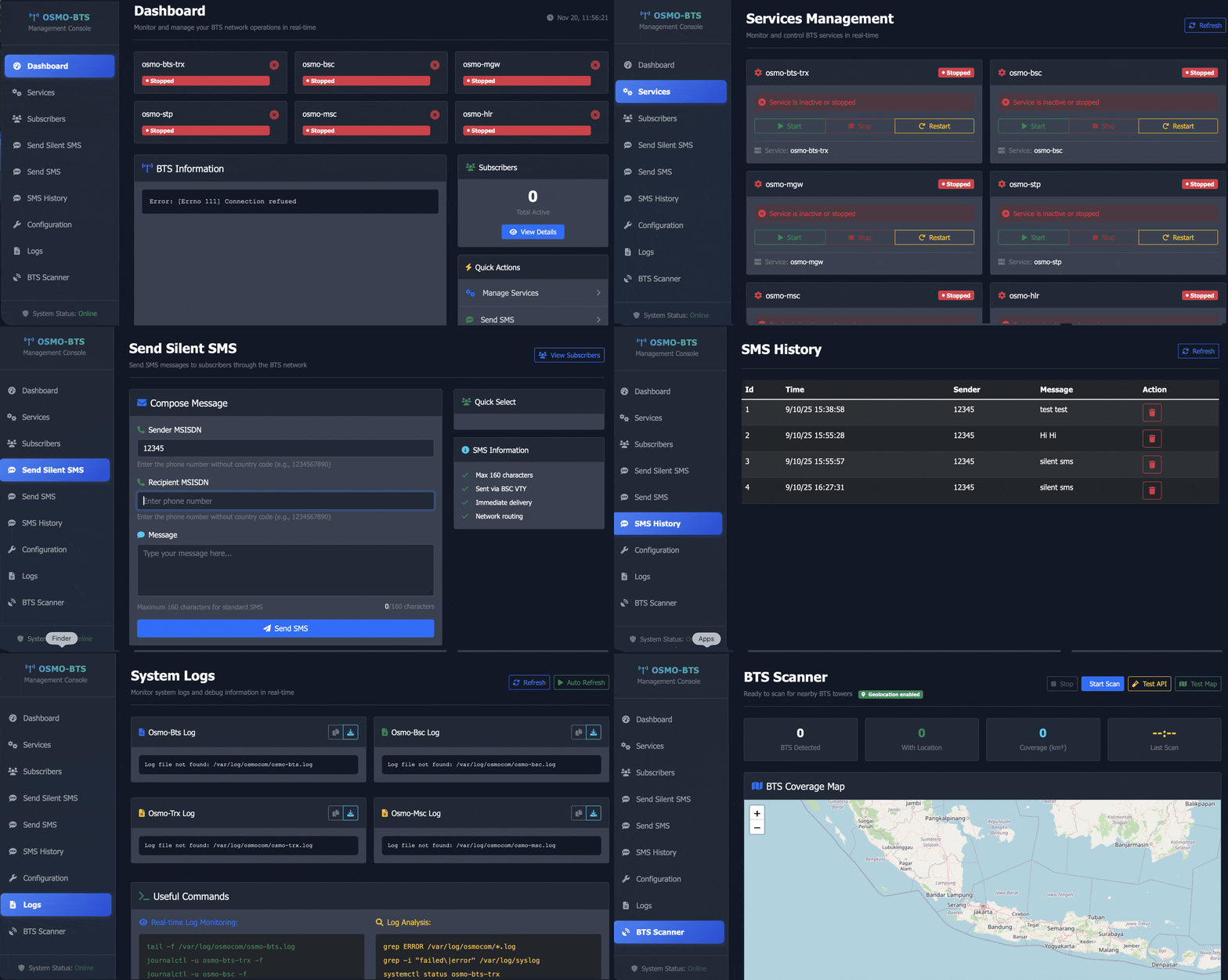
✅ OSMO-BTS GUI Interface – Introduction
The OSMO-BTS GUI Interface is a powerful and user-friendly graphical interface designed to simplify the management, monitoring, and configuration of Osmocom Base Transceiver Stations (BTS). Whether you are running a test GSM network, conducting research, or learning telecom protocols, this GUI allows you to control your BTS without complex command-line knowledge.
On our platform, we also provide complete setup, installation, configuration, and troubleshooting services, making it easier for beginners and professionals to deploy GSM test networks successfully
⭐ Key Features
✔ 1. Easy-to-Use Dashboard
Access all BTS functions including TRX, ARFCN, power, logging, and connection status in a clean and modern interface.
✔ 2. Real-Time Monitoring
View live logs, traffic, signal strength, connected devices, and BTS performance metrics.
✔ 3. One-Click Commands
Start, stop, and restart services like osmo-bts, osmo-nitb, LCR, and OsmoTRX with simple buttons.
✔ 4. Multi-Device Support
Works with multiple Osmocom-based devices such as:
-
OsmoBTS (sysmoBTS, Nutaq, etc.)
-
USRP (B200/B210)
-
LimeSDR
-
BladeRF
-
HackRF (limited GSM testing)
✔ 5. Web-Based GUI
No special software needed — access from any browser.
✔ 6. Log + Error Analyzer
Automatically detects common BTS issues such as clock sync errors, TRX failures, UHD issues, Calypso problems, and more.
✔ 7. Secure Authentication System
Admin login panel to protect your GSM setup.
✔ 8. Custom Installation Support
We help you install the GUI on:
Linux, Ubuntu, Debian, Kali, Raspberry Pi, or Cloud VPS.
🧩 Required Hardware (Depending on Your Setup)
Minimum Hardware
-
A computer or laptop (Ubuntu recommended)
-
Supported SDR hardware:
-
USRP B200/B210
-
LimeSDR Mini / LimeSDR USB
-
sysmoBTS
-
OsmoBTS compatible hardware
-
-
Power supply for BTS device
Optional Hardware
-
GPSDO (for clock accuracy)
-
External antenna
-
Duplexer / Filter (for clean RF environment)
🖥️ Required Software
You will need the following software packages installed (which we also provide as part of our service):
-
OsmoBTS
-
Osmo-TRX
-
Osmo-NITB or OsmoHLR
-
Osmo-MSC / Osmo-SGSN
-
UHD Drivers (for USRP)
-
LimeSuite Drivers (for LimeSDR)
-
Asterisk (optional for voice routing)
🔧 Included Tools in the GUI Package
-
BTS Controller Panel
-
TRX Manager
-
System Log Viewer
-
BTS Status Checker
-
IMSI/IMEI Monitor (Depending on legal environment)
-
Frequency & Power Configuration
-
Custom BTS Scripts (start/stop/restart)
-
Backup & Restore Tool
-
API Integration Support
👤 Who This GUI Is For
This GUI is perfect for:
✔ 1. Students & Researchers
Ideal for learning GSM architecture, BTS operation, and telecom experimentation.
✔ 2. Security Professionals & Pentesters
Useful for GSM security testing and controlled network research.
✔ 3. Telecom Hobbyists
People experimenting with USRP/LimeSDR/BladeRF and OSMO stack.
✔ 4. Organizations & Labs
For creating indoor GSM test networks for development and testing.
✔ 5. Developers Working on GSM Projects
Simplifies workflow with one-click TRX controls and log management.
🔥 Why Choose Our Service?
✔ Complete Setup + Installation
We remotely install everything for you.
✔ Troubleshooting Support
Fix problems like UHD errors, TRX not starting, no clock, sync issues, BTS no RF, etc.
✔ High-Quality GUI With Lifetime Updates
You get lifetime access to updates and improvements.
✔ Documentation + Video Guide
We provide step-by-step instructions.
✔ Secure Deployment
We configure your setup with best security practices.
📦 What You Will Receive
-
OSMO-BTS GUI Software Package
-
Installation on your system (Remote)
-
Full BTS Setup (TRX, NITB, HLR, MSC, Config)
-
One-Click Control Panel
-
User Manual
-
Lifetime updates
-
Support + Troubleshooting
Reviews